The Cat Slot manual
What your Cat Slot does, and how to fix the usual problems. Where the machine shows your cat's name, this page says "your cat".
Getting started
Power
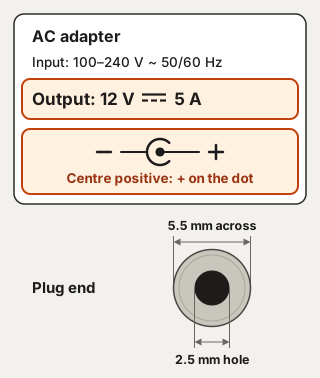
The Cat Slot runs on a 12 V DC, 5 A power supply with a 5.5 × 2.5 mm barrel plug, centre positive. Using your own? Check its label for each of these.
The power supply plugs into the left side of the machine, just below the power switch.
Unplug the power supply before you open the machine. A feeding time, a win or a button can start the motors at any moment.
Joining your Wi-Fi
- Plug in the power supply and switch the machine on. It starts its own Wi-Fi network, CatSlot-Setup, with no password.
- Join CatSlot-Setup on your phone. The setup page should open by itself. If not, go to
http://192.168.4.1. - Type your Wi-Fi's name, or tap "Scan networks" and pick it. Type the password and press "Connect". The machine only joins 2.4 GHz networks.
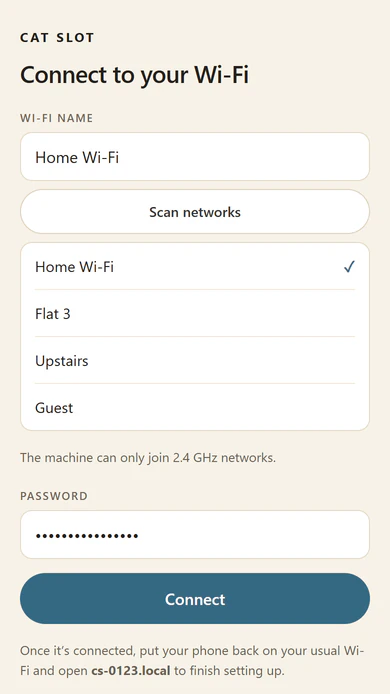
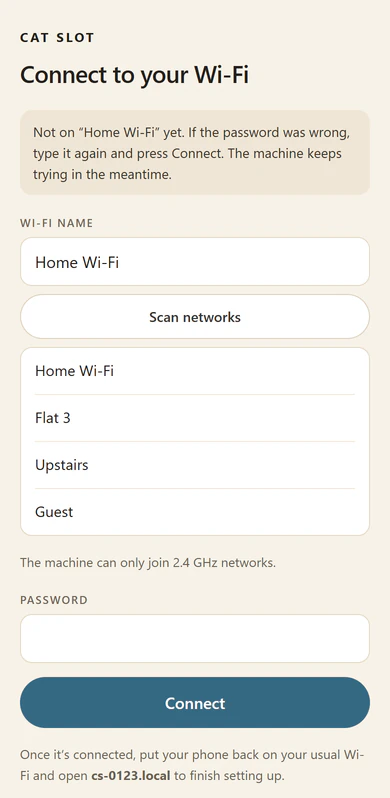
- Once the machine joins, CatSlot-Setup Wi-Fi network switches itself off. If the page says "Not on … yet", type the password again and press "Connect".
- Put your phone back on your usual Wi-Fi, and open the address the page gives you, such as
cs-0123.local.


Setting up your machine
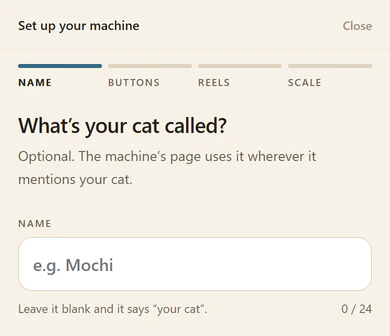
The first time you open the machine's page on your Wi-Fi, it shows "Set up your machine", in four steps: Name, Buttons, Reels and Scale. Leave the hopper empty until the scale step is done.
- Name: type your cat's name and press "Next", or press "Skip". Without a name, the page says "your cat".
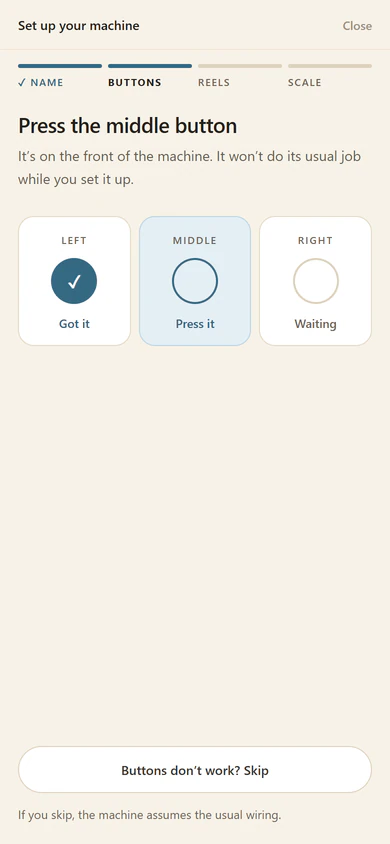
- Buttons: press the left, middle and right buttons as it asks, until it says "All three buttons found".
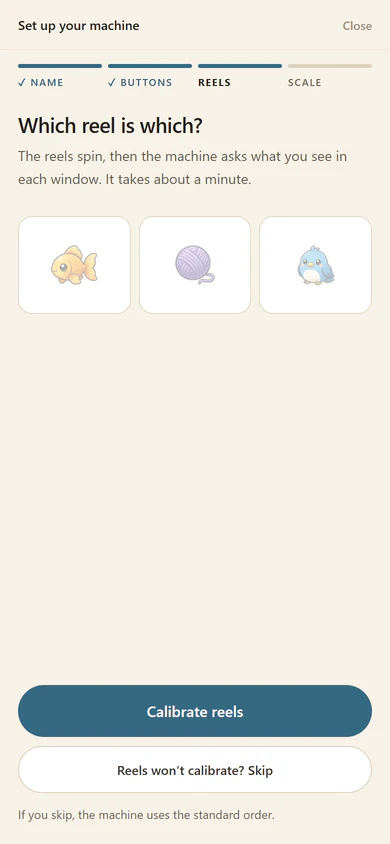
- Reels: press "Calibrate reels" and answer its two questions (see Calibrate reels). Keep hands and paws clear while the reels spin.
- Scale: press "Set up the scale" (see Setting up the scale), or "Skip" to do it later from Home.


Don't skip Buttons or Reels. These steps teach the machine how its buttons and reels are wired, and without them the reels can stop in the wrong windows and the buttons can swap jobs. If a step won't work, press its Skip and message us. Message us too if the buttons ever do the wrong things.
If you close the page part-way, the setup picks up where you left off. Once it's finished, it doesn't come back: you can change the name in Settings and set up the scale from Home.
The machine's page
Open it on a phone or computer on your Wi-Fi. Any of these addresses works:
- its serial, in lower case, such as
http://cs-0123.local - its name, if you've given it one in Settings → This machine: a machine named Kitchen is
http://catslot-kitchen.local http://catslot.local, for the first machine on your network- its IP address, shown in Settings → Wi-Fi

Type http://, not https://. The tabs are Home, Feeding, Diary and Settings, and warnings show across the top.

Treats
Use dry food or dry treats up to 10 × 10 × 7 mm, never wet or soft ones. Bigger pieces? Message us.
To fill the hopper, take off the lid and pour the treats into the refill funnel. The hopper hangs on a scale, so keep anything from pressing on it.
How much is left
With the hopper scale set up, Home shows about how many treats are left, and says "Treats are running low" at about 15. You can change that number in Settings → Treat warnings. Until the scale is set up there's no count, but the machine still tells you when it runs out.
Setting up the scale
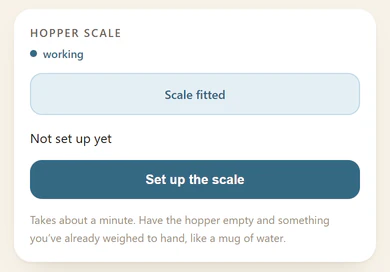
Do it in the first-time setup, or later from Home, where the Treats card shows "Set up the scale". From Home, it opens Service mode at the Hopper scale card: press that card's "Set up the scale" to start. You'll need the hopper empty and something you've weighed on a kitchen scale.

- Take every treat out, put the lid back on, and press "Zero it".
- Put in something over about 100 g that you've weighed, such as a mug of water or a bag of rice. Type in its weight and press "Calibrate".
- Take it out and press "I've taken it out". The scale has to read within 4 g of zero.
Keep your hands off the machine while it weighs. After that, it learns what a treat weighs by itself, even when you change treats. Setting it up from Home turns on Service mode, so press "Exit" on the red banner when you're done: the lever stays locked and feeding times stay paused until you do. (For a very different treat, see Service mode.)
Feeding times
On the Feeding tab, set up to 8 feeding times. For each, choose:
- its time, days and number of treats (1 to 50)
- how long it stays open, up to 24 hours
- how the treats come out: all in one win, one per win, or a mix
- whether the machine feeds by itself, or your cat pulls the lever
- whether treats your cat leaves are forgotten or saved for next time
- a reminder call, for lever feedings


Feeding times need the machine's clock, which it sets over Wi-Fi. Once the clock is set, they carry on even if the Wi-Fi drops.
"Start a feeding now" starts a one-off: 5 treats, open for an hour, and your cat pulls the lever. You can change those first.
Quiet hours
Quiet hours are on the Feeding tab too. They're off until you switch them on, and when you first do, they run from 10 pm to 7 am. They need the clock.
- "Lever off": pulls do nothing, unless a feeding is waiting for your cat.
- "Silent only": the lever works, but the machine plays nothing by itself.

A sound you ask for, like Call the cat over, plays anyway. Feeding times happen as usual, silently with "Silent only".
Playing
One pull of the lever is one go. Three of the same symbol wins:
- Goldfish: the jackpot, 3 treats
- Mouse or Bird: a big win, 2 treats
- Paw, Yarn, Feather or Milk: a small win, 1 treat
- Cucumber: nothing
In Settings, Winning odds sets how often your cat wins (20% to start), the most treats a day from playing, and a sure win after a number of goes. Feeding times don't count towards the daily limit. At the limit, a win gets a cheer but no treat. Win sizes sets how often each win comes, and what it pays.
"Rig a win" on the page makes the next go a win. "Spin the reels" gives a normal spin that can pay, even with the lever locked.
The front buttons
The Left, Middle and Right Buttons can each do one thing on a press, another on a double press (two quick presses) and another on a hold (about a second). All nine start as "— nothing". Choose them in Settings → Buttons.

Some work only on a hold, such as "Refilled", "Clear the jam warning", "Zero the scale" and "Start or end a feeding". That last one starts a feeding of 5 treats for an hour, with the feeding call, and a second hold ends it. Empty the hopper before you use "Zero the scale".
A button with something resting on it stops working until it's clear. Holding all three for 10 seconds resets the Wi-Fi (see Fixing problems).
Sounds
In Settings → Sound, set the volume from 0 (silent) to 30. Under "Which sounds play", switch each one on or off: Jackpot, Big win, Small win, Bust, Loss, Feeding call, Attract chirp and Treats low. "Got it", "Done" and the start-up sound always play. For quiet nights, see Quiet hours.

Updates
When an update is ready, Home shows a card, "An update is ready". Press "Install it now", or "Not now" to move it to the top of Settings, where "Show me" brings it back. A required update has no "Not now", and installs by itself at the time the card gives.

An update installs when the machine is idle and on Wi-Fi. It takes about a minute, and the lever, treats and feeding times pause until the machine restarts. "Your settings, feeding times and diary are kept." If an update doesn't go in, the machine carries on with the version it had.
To install updates without being asked, turn on "Install updates without asking me".
Home Assistant
In Settings → Home Assistant, enter your MQTT broker's details and press "Apply & connect". Within about a minute, the machine appears in Home Assistant by itself. "Most treats a day from Home Assistant" caps the treats it gives (10 to start), and you can only change it on the machine's page. Message us if you'd like a dashboard for it.

Don't forward a port on your router to the machine.
Service mode
Service mode is the machine's technician view. You only need three of its cards. Leave everything else alone.
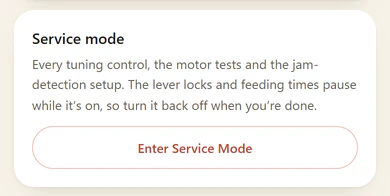
- In Settings, go to the last card, Service mode, and press "Enter Service Mode". A red banner says "Lever locked · feeding times paused".
- Open the Calibration tab. On a phone, it's in the red row above the usual tabs. Use only these cards:
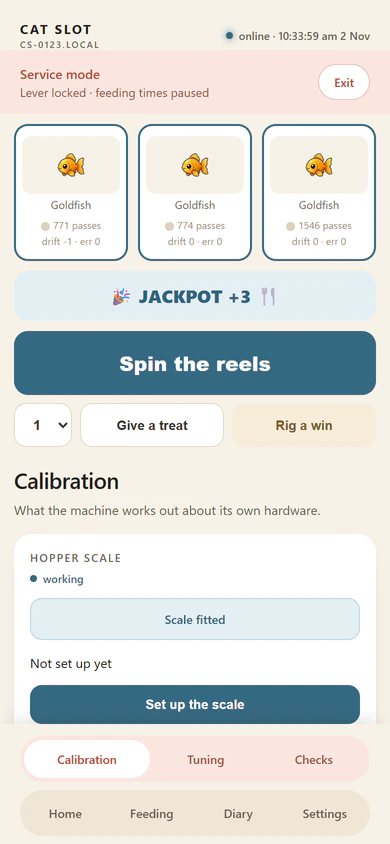
- Hopper scale: to set up the scale (see Treats).
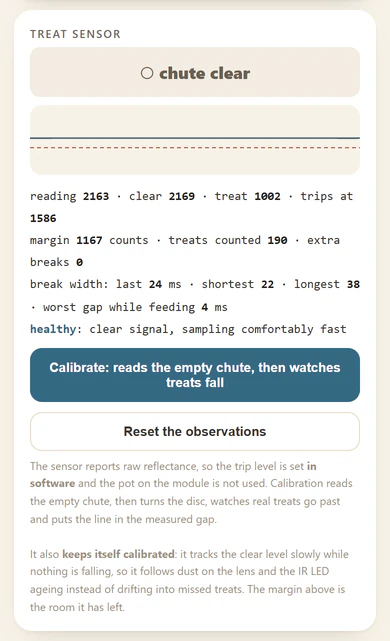
- Treat sensor: for a very different treat. Put treats in the hopper first, then press "Calibrate: reads the empty chute, then watches treats fall". About 6 treats drop into the tray. If a new treat jams often, message us.
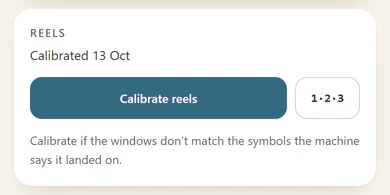
- Reels: "Calibrate reels", after the reels have been unplugged.
- Hopper scale: to set up the scale (see Treats).
- When you're done, press "Exit" on the red banner. The Settings card still says "Enter Service Mode", so use the banner.


Calibrate reels
- "The reels will spin." "Keep hands and paws clear." Press "Start". It takes about a minute.
- Each reel turns on its own, then they stop on three symbols. You don't need to do anything.
- "Round 1 of 2": "Look at the machine. What's in each window, left to right?" Tap or swipe each wheel on the screen until it matches, and press "That's what I see".
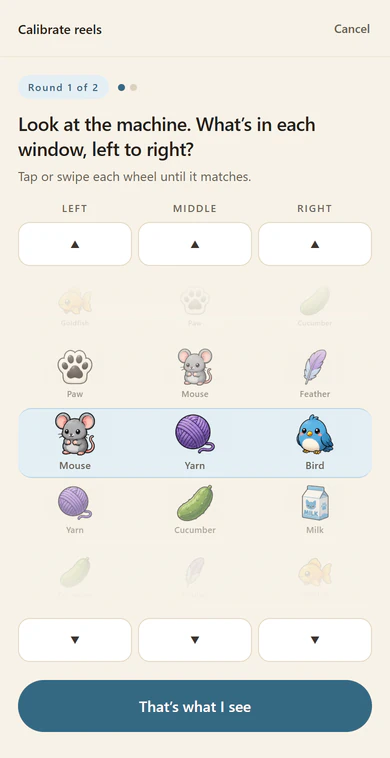
- "Round 2 of 2": "The reels have moved. Same question." Do it again.
- "Reels paired and in order". Press "Done".

If it says "That doesn't match what the reels should show.", look again and press "Check again". If a reel "didn't find its sensor", or "Two reels are plugged into the same sensor.", press "Cancel" and check the sensor plugs, with the power unplugged.
Looking after it
Unplug the power supply first. You can take the machine apart to clean it and wipe it down. Clean only the hopper, the chute and the disc. Wash only parts with no electrics in them, and dry everything thoroughly before you put the machine back together. If you unplugged the reels, run Calibrate reels afterwards.
Fixing problems
A new Wi-Fi network or password
The machine keeps trying the Wi-Fi it knows. To give it a new one:
- Press all three front buttons at the same moment, and hold them for 10 seconds. "Got it" plays when all three are down, and "done" at 10 seconds.
- The machine forgets its Wi-Fi name and password, and starts CatSlot-Setup. It gives no treats and erases nothing else.
- Carry on from step 2 of "Joining your Wi-Fi".
The lever and feeding times keep working meanwhile.
If you change the Wi-Fi in Settings → Wi-Fi and get the password wrong, the machine stays offline until you do the hold.
Out of treats
With the scale set up, fill the hopper and the "Out of treats" warning clears by itself. Before then, fill the hopper and press "Refilled". Until then, feeding times wait with their treats kept, and your cat can still play.


A stuck treat
The page says "The treat sensor is blocked. Check the chute for a stuck treat and wipe the sensor." Once it's clear, feeding carries on by itself.
A jam
The machine tries to clear a jam itself first. When it can't, it stops, and the page says "Treat jam: clear the dispenser, then press Fixed it". No treats come out until you do.

- Check the chute, and take out any stuck treat.
- Press "Fixed it". Outside a feeding, it gives the treats the jam held back. During a feeding, they come on your cat's next win.
If it keeps jamming, clear it by hand:
- Unplug the power supply.
- Take off the lid, then the back cover.
- Turn the disc slowly by hand, left and right, to free the treat. It will feel notchy.
- If the treat comes free, put the back cover on, then the lid, and plug the power back in. Unplugging cleared the warning, so there's no "Fixed it" to press.
If it's still stuck, take the reels out:
- Take a photo of the plugs on the board.
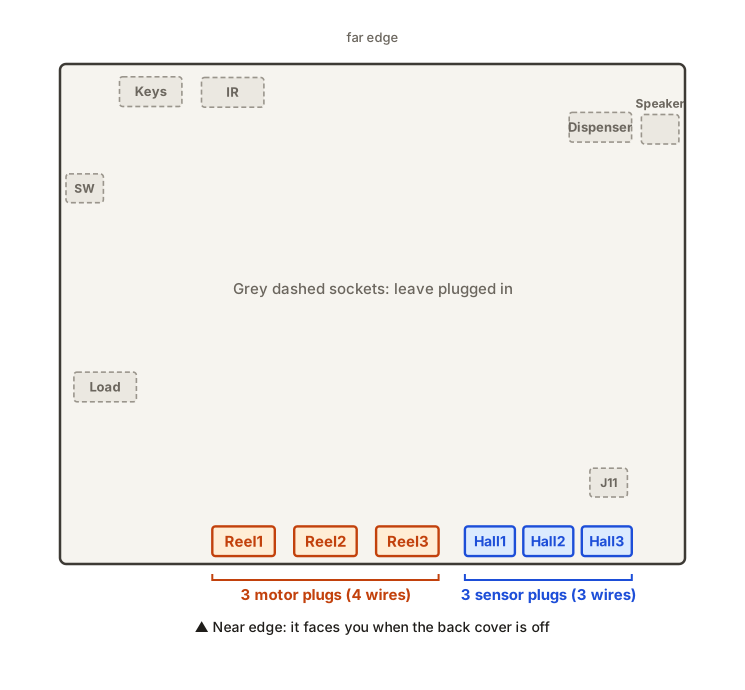
- Unplug the reels. Along the edge nearest you are their three motor plugs, in Reel1, Reel2 and Reel3, and to the right their three sensor plugs, in Hall1, Hall2 and Hall3. Leave every other plug in.
- Take out the reel baseplate's keys, and lift the reel baseplate out.
- Take off the hopper's lid. Find what's jamming the dispenser, and take it out.
- Put the hopper's lid back on. Put the reel baseplate back in, and lock it with its keys.
- Plug the motor plugs back into Reel1 to Reel3, and the sensor plugs into Hall1 to Hall3. Your photo shows where they came out. Which of the three each one goes in doesn't matter, because Calibrate reels sorts it out. Never put a motor plug anywhere else: it also fits the Dispenser, IR, Keys and Load sockets, and in some of those it can damage the board.
- Put the back cover on, then the lid, and plug the power back in.
- Run Calibrate reels in Service mode, so the machine knows which reel is which.
A missed feeding
"your cat missed a feeding" means a feeding ended with treats not taken, or ended while the power was off. Press "OK". The leftover treats are forgotten or saved for next time, as you set that feeding time.

After a power cut
The machine keeps its settings, feeding times, Diary, Wi-Fi and scale setup. A feeding that was running carries on if its time isn't up, or counts as missed if it is. The machine forgets warnings, a lever lock and a rigged win, and notices any warning again if it still applies.
It needs Wi-Fi to set its clock again. If the Diary says "restarted after its power dipped. Check the power lead.", check the power supply and its lead.
No clock yet
The header says "no clock yet" when the machine doesn't know the time. Feeding times and quiet hours wait for it, but your cat can still play. The clock comes from the internet, so check that the machine is on your Wi-Fi and that your internet works.


The page won't open
- Check that your phone or computer is on your usual Wi-Fi, not CatSlot-Setup.
- Type
http://, nothttps://. - If a .local address won't open, use the machine's IP address from your router's list of devices. Some browsers, such as Chrome on Windows, can fail with .local names.
If the page loses touch with the machine, it keeps showing what it last knew, with no error. Reload it if it looks stuck.
The lever does nothing
The lever is ignored while the reels turn, while an update installs, in Service mode (press "Exit" on the red banner), in "Lever off" quiet hours, and when the page says "The lever is locked: pulls do nothing" (press "Unlock").

No sound
Check the volume in Settings → Sound: 0 is silent, and "Mute / unmute" sets it to 0. Then check that the sound is on under "Which sounds play", and whether quiet hours are set to "Silent only".
Starting again
There's no factory reset. The three-button hold forgets only the Wi-Fi. To start from new, message us.
Help
For the warranty, or anything this page doesn't cover, message us.
This manual is for version 1.29.0 of the machine's software.